
Customer management and billing for WordPress
Manage Customers,
Send Invoices, and more.
Tired of paying monthly fees for proprietary platforms?
Take control of your customer records and billing with Karks CRM!
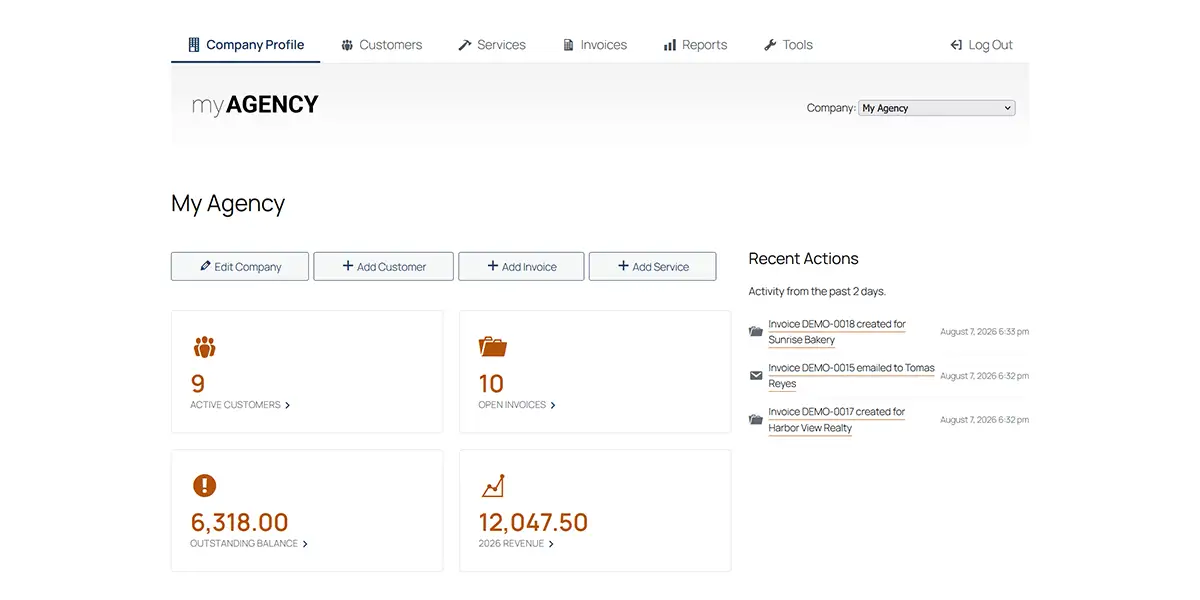
What Is Karks CRM?
Karks CRM is a free WordPress plugin designed for easy customer management and invoicing. It’s perfect for small businesses and comes packed with helpful features. Add your customers and services, then start creating invoices. You can export them as a custom PDF file or email invoices directly from within WordPress!
It’s simple and easy to customize. Add your company logo, tweak the invoice footer, and write a custom email message to your clients. You can even adjust the color scheme. It’s all included!
Have more than one company? We have you covered! Karks CMS supports multiple companies – each with its own logo, customers, services, and invoices.
Features
Invoicing Made Easy
Karks CRM aims to keep things simple. You won’t find intrusive AI or payment gateway hassles.
Just set up your business (or multiple ones) and start sending invoices!
Customers and Jobs
Easily add unlimited customers to your company. You can even create specific jobs for each customer.
Custom PDF Invoices
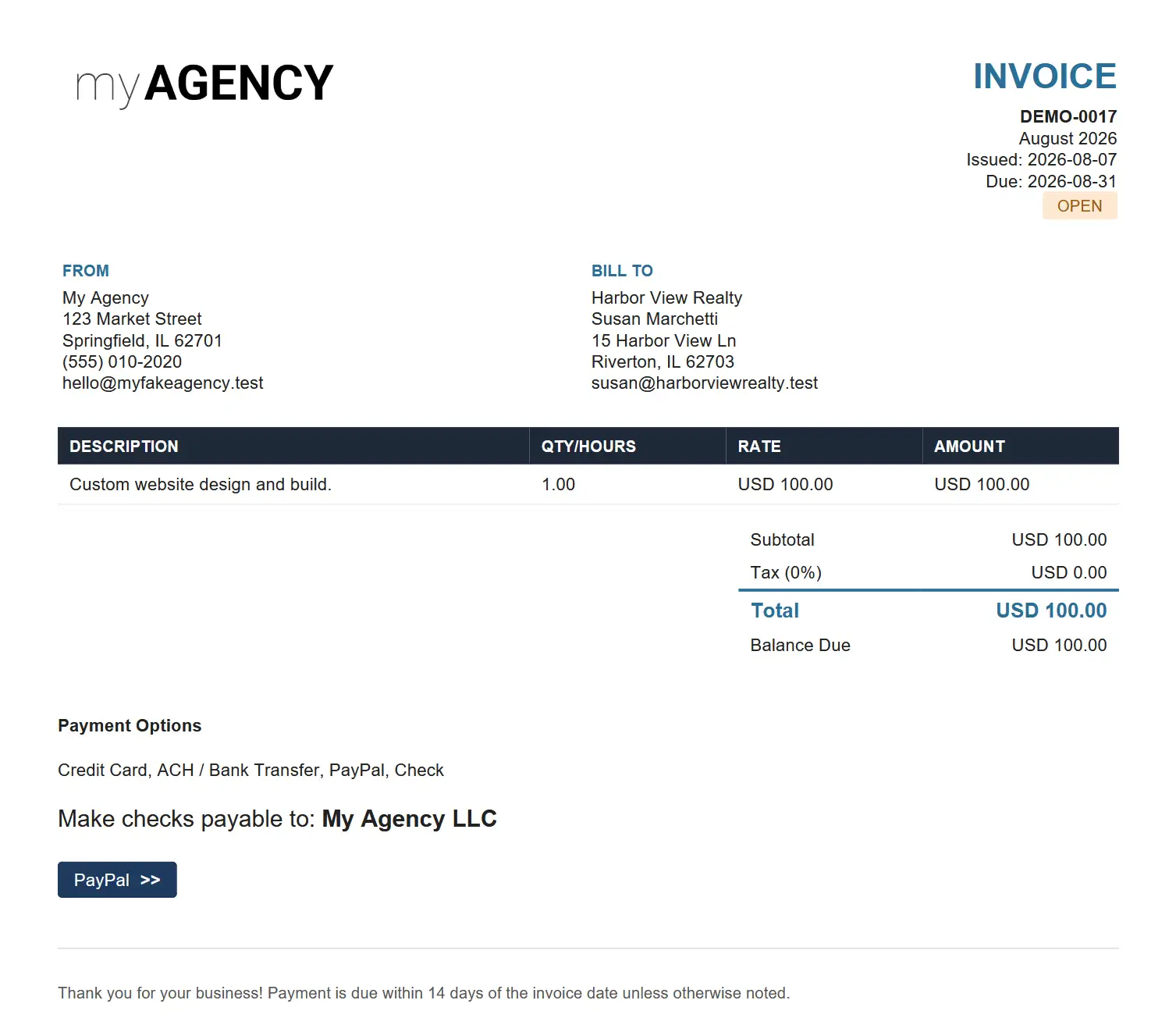
Karks CRM converts your invoices into custom PDF files for sharing with clients. Add your logo, choose an accent color, and include a custom footer message.
Company Services and Pricing
Manage a list of services and pricing. Services can be based on a per-project or hourly fee. You can also override pricing on invoices.
Add Custom Payment Links
Why reinvent the wheel? Odds are, you already accept payments through a shopping cart, form, or even PayPal. Define your accepted payment methods and add links on your invoices.
Email Invoices to Customers
Use the included email functionality to send PDF invoices directly to your customers from within WordPress! The plugin even logs sent emails so you won’t have to ask: Did I send this yet?
Reports
Generate custom reports for your company’s revenue, open invoices, and individual customers. Export them as a CSV file for your records.
Import and Export Data
It’s your data! Karks CRM has tools for importing and exporting customers, invoices, and services. Export your company profile as a backup or use it on another website.
Track Open Invoices
You’re never more than a click away from viewing open invoices. View an aggregate list or narrow your search to specific clients.
Easy Company Management
Karks CRM lets you manage customers and invoices your way. Choose from the included front or admin area interfaces. Either way, you’re in control!
FAQS
Have a question about Karks CRM?
Here are some answers to commonly asked questions.
Who is Karks CRM for?
Karks CRM is a great fit for any small business looking for a simple way to manage customers and send invoices.
Is Karks CRM really free?
Yes! The core plugin is and always will be free for anyone to use. There may be some paid add-ons available in the future, based on demand.
How do email invoices work?
With Karks CRM, you can email customer invoices directly within WordPress. You can customize the email to meet your needs, and there are merge tags for further personalization. Your message and a copy of the PDF will be sent to your customer. The plugin also uses the contact information already in a customer’s profile, saving you from repeatedly filling out the same address.
The plugin uses the built-in WordPress email functionality. However, we recommend using a mail delivery service or sending via a separate SMTP server to avoid spam issues.
What customer data does Karks CRM store?
The plugin stores any customer contact and invoice data you input. That could include (but is not limited to) physical addresses, email addresses, contact names, phone numbers, and invoice details (pricing, services rendered, etc.)
Karks CRM DOES NOT collect payment information by default. It doesn’t connect to any third-party payment gateways. Please do not use this plugin to store sensitive data!
Who can access the CRM?
By default, only site Administrators and users with the included custom CRM Manager roles can access customer data. Other users won’t be able to access the CRM.
What are the server requirements for Karks CRM?
You can use Karks CRM on any WordPress installation, whether locally or through a traditional web host. The plugin will work on any existing site. However, you could create a separate site just for your invoicing needs.
As Karks CRM stores customer data, we recommend using the most secure hosting environment possible.
Why doesn’t the plugin work with payment gateways or other third-party services?
It’s all about security and ease of maintenance. Building connections to payment gateways or other services requires constant vigilance. That clashes with the simple approach of this plugin.
Note: The plugin allows you to add custom payment links, which will appear as buttons on your invoices. You can also add payment instructions to your emails.
Who built Karks CRM?
Karks CRM was built by me (Eric Karkovack)! I’m a web developer with over 30 years of experience. I also write and host WordPress-oriented podcasts for Speckyboy Design Magazine and The WP Minute.
I created this plugin to manage my customer invoicing and wanted to move on from the proprietary tool I was using. My goal was to create a simple, straightforward tool for generating, tracking, and sending invoices to clients.
Sharing it with you is my little way to give back to the WordPress community, which has given so much to me. 🙏
Download
Download Karks CRM on GitHub
Visit WordPress.org to grab the latest version.
Also, check out the Getting Started guide.
